

How to test a sequence
Test the sequence in the Test AI Agent panel
Section titled “Test the sequence in the Test AI Agent panel”The panel runs the same matching and writes the same sequence replies as a real DM, but it sends nothing to Instagram.
Read the lightning label, not the reply. The panel answers every message, and Instagram does not. A reply with the label is a reply that Instagram would send. A reply without the label means that no sequence matched, and on Instagram the person would get nothing.
- Click Test AI Agent at the bottom right. A panel named Sandbox opens.
- Click the circular arrows at the top left of the panel. This clears the test conversation. Do this before every test. Without it, your next message continues the earlier test.
- Type a message as a person would write it, and press Enter.
The panel calls you Example User and calls the Agent Persona. When a reply belongs to a sequence, a lightning icon and Sequence: with the sequence name appear above it.
We sent five messages to the example. A second sequence, “Free guide request”, was also switched on. It sends a link when a person asks for a guide.
| # | Test message | What the Agent did | What this shows |
|---|---|---|---|
| 1 | hey where are you rn? | Started Airport check. The reply began with the fixed line. | The scenario matched without a keyword. |
| 2 | oh nice, how long is your layover? | Stayed in Airport check. The fixed line did not repeat. | One action can last for several messages. |
| 3 | btw can i get that comment guide? | Stayed in Airport check and returned to the travel question. | A running sequence keeps the conversation. “Free guide request” did not start. |
| 4 | i don’t like planes | Sent nothing. The panel shows “Persona chose not to respond.” | The Until part ended the sequence. |
| 5 | can you send me the comment guide? i want more replies on my posts | Started Free guide request and sent the link. | After one sequence ends, another can start. |
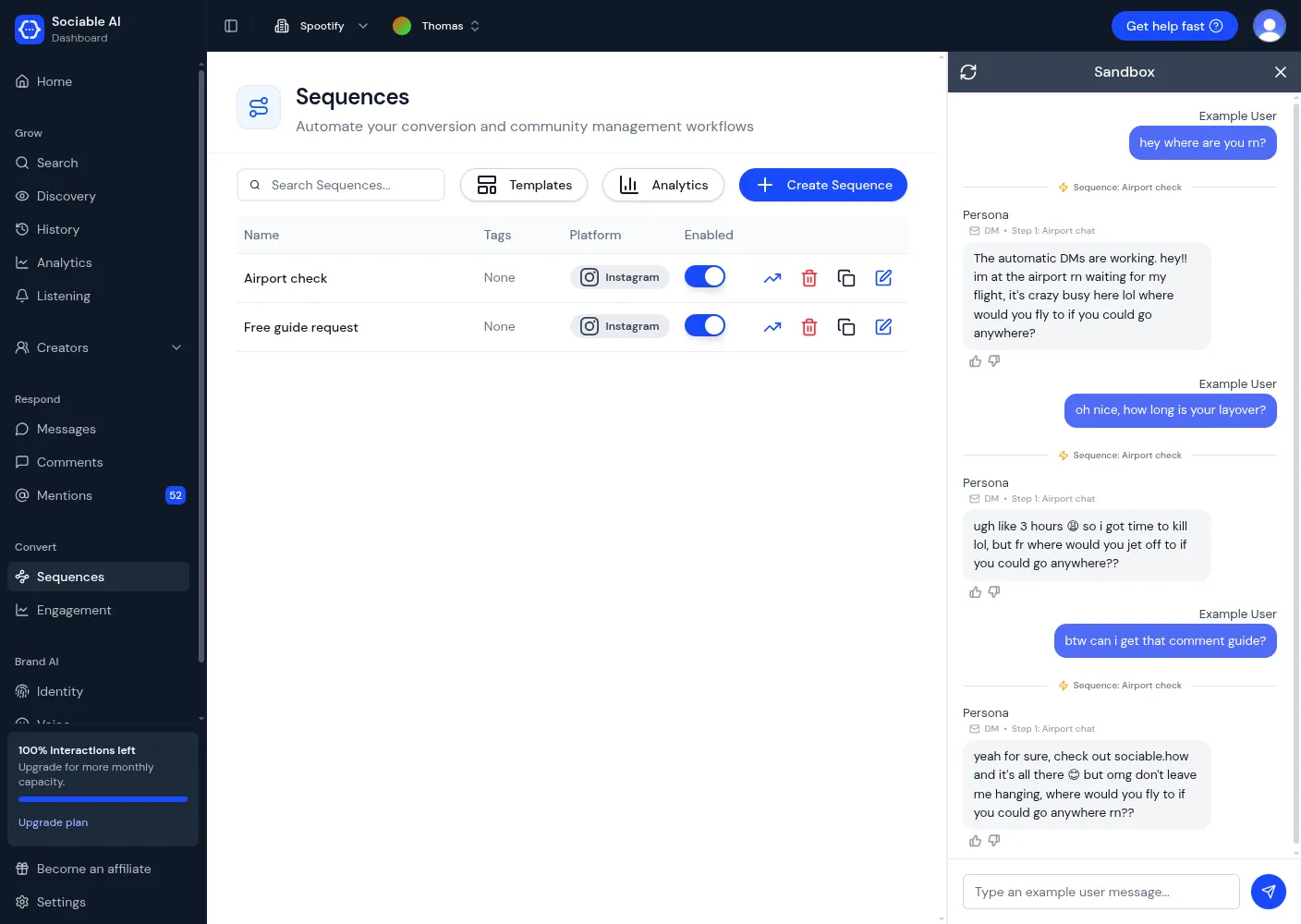
Messages 1 to 3. All three replies belong to Airport check.
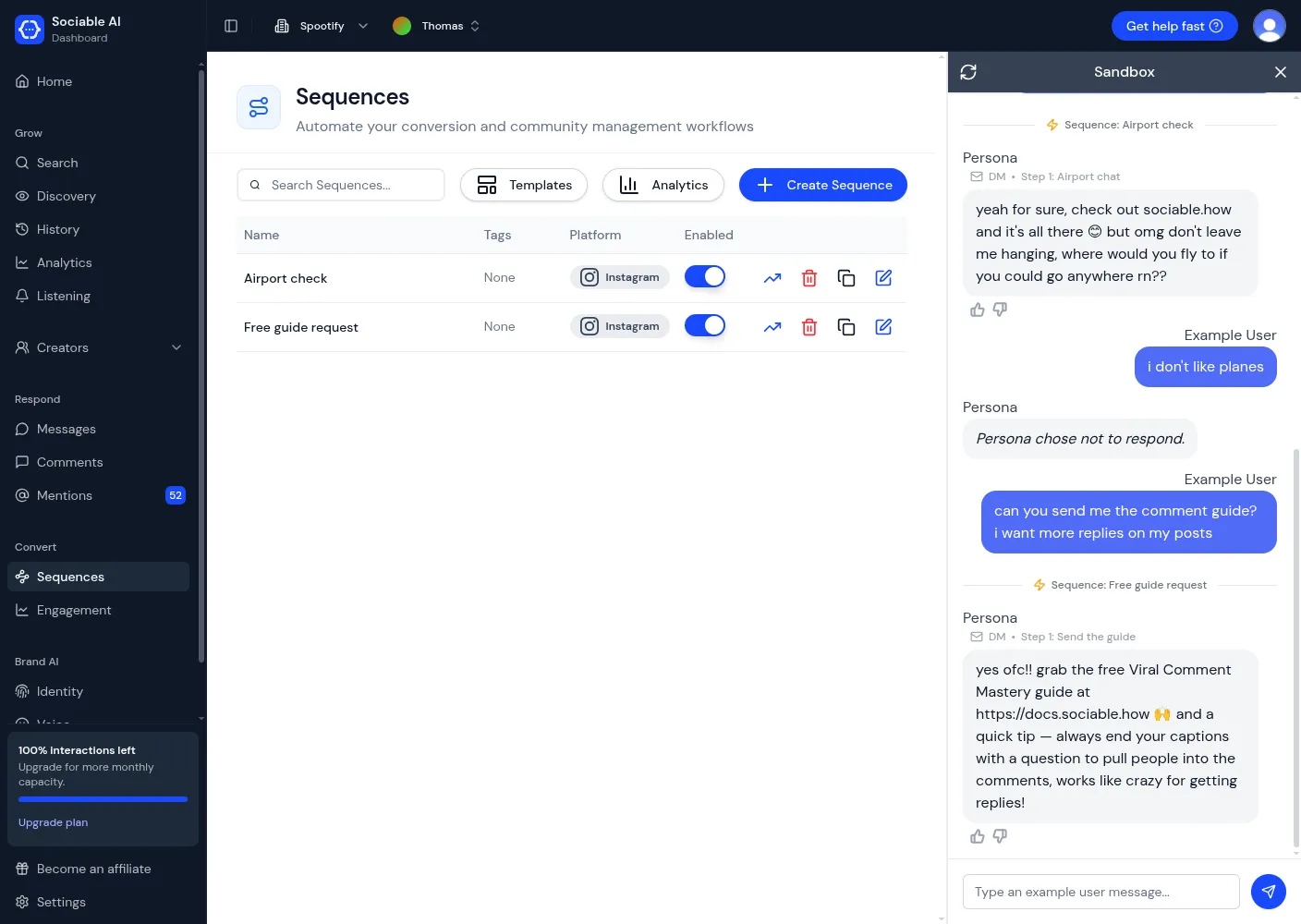
Messages 4 and 5. The stop trigger ends the first sequence, and the second sequence starts.
The wording of each reply changes from test to test. Check what the Agent does, not the exact words.
How to read the panel:
- The sequence label appears on every reply that belongs to the sequence. It does not mean that the sequence started again.
- The panel does not show when a sequence ends. A reply without a sequence label means that no sequence is running, and Instagram would send nothing.
- The panel cannot test Follow up or comment triggers.
- Tests do not appear on the Messages page or in the sequence totals.
Revise the wording until the test passes
Section titled “Revise the wording until the test passes”A first draft often does part of what you want. Change one thing, clear the panel, and test again.
Our first draft of the Then instructions ended after “You’re currently texting from an airport.” With that draft, the sequence ended after one reply. The second reply has no sequence label:
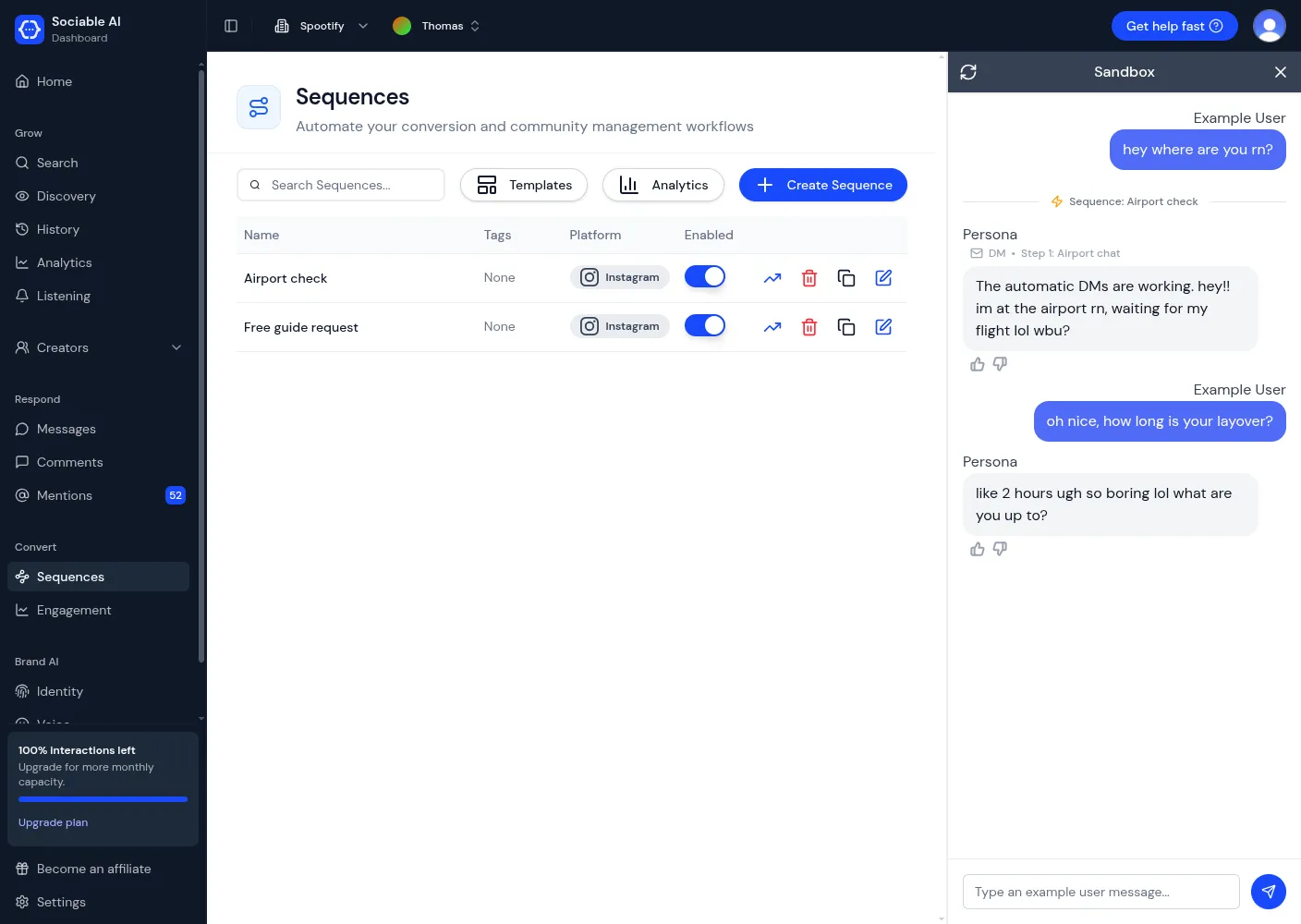
First draft. The second reply does not belong to the sequence. On Instagram, the person would get no second reply.
We added two sentences: “Keep chatting with them about travel. This step is complete only once they tell you where they would fly to next.” The sequence now continues:
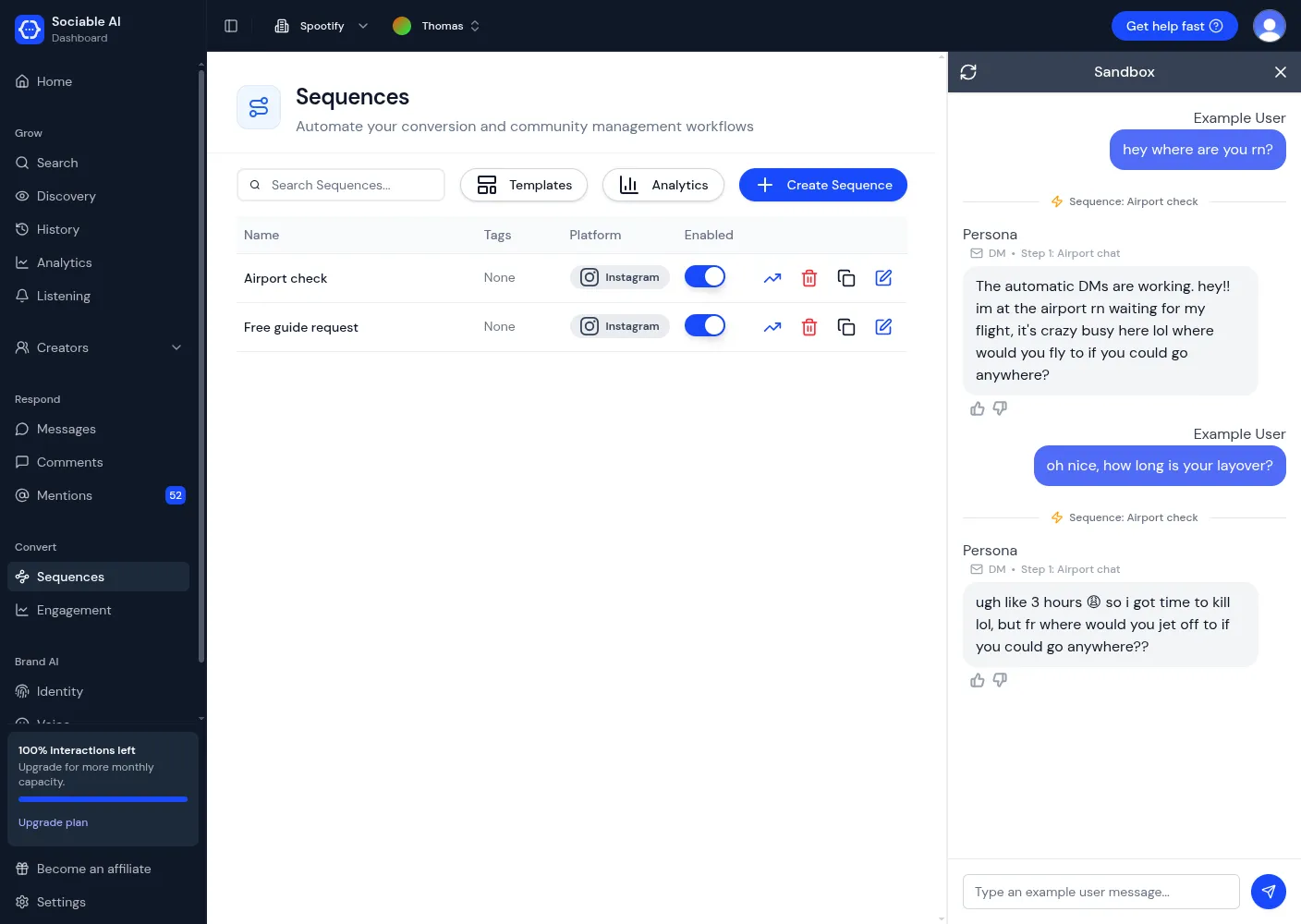
Revised instructions. Both replies belong to the sequence.
Four techniques that worked in our tests:
- Put fixed text first and in quotation marks. The Agent then sends it once, at the start.
- Describe what the person wants, not the words that they use. A scenario such as “asks for your general location” also matches “where are you rn?”.
- Say when the action is complete. Without this, the Agent decides for itself, and it can end the sequence after one reply.
- Keep the scenarios of different sequences clearly apart. See the next section.
Check a real DM on Instagram
Section titled “Check a real DM on Instagram”This check needs a second Instagram account. A sequence does not reply to messages that you send from the connected account itself.
- From the second account, send a DM to your connected account. Write a message that fits your scenario.
- Read the reply.
- Send a message that ends the sequence, so that the conversation is not left inside it. The example sends “i don’t like planes”.
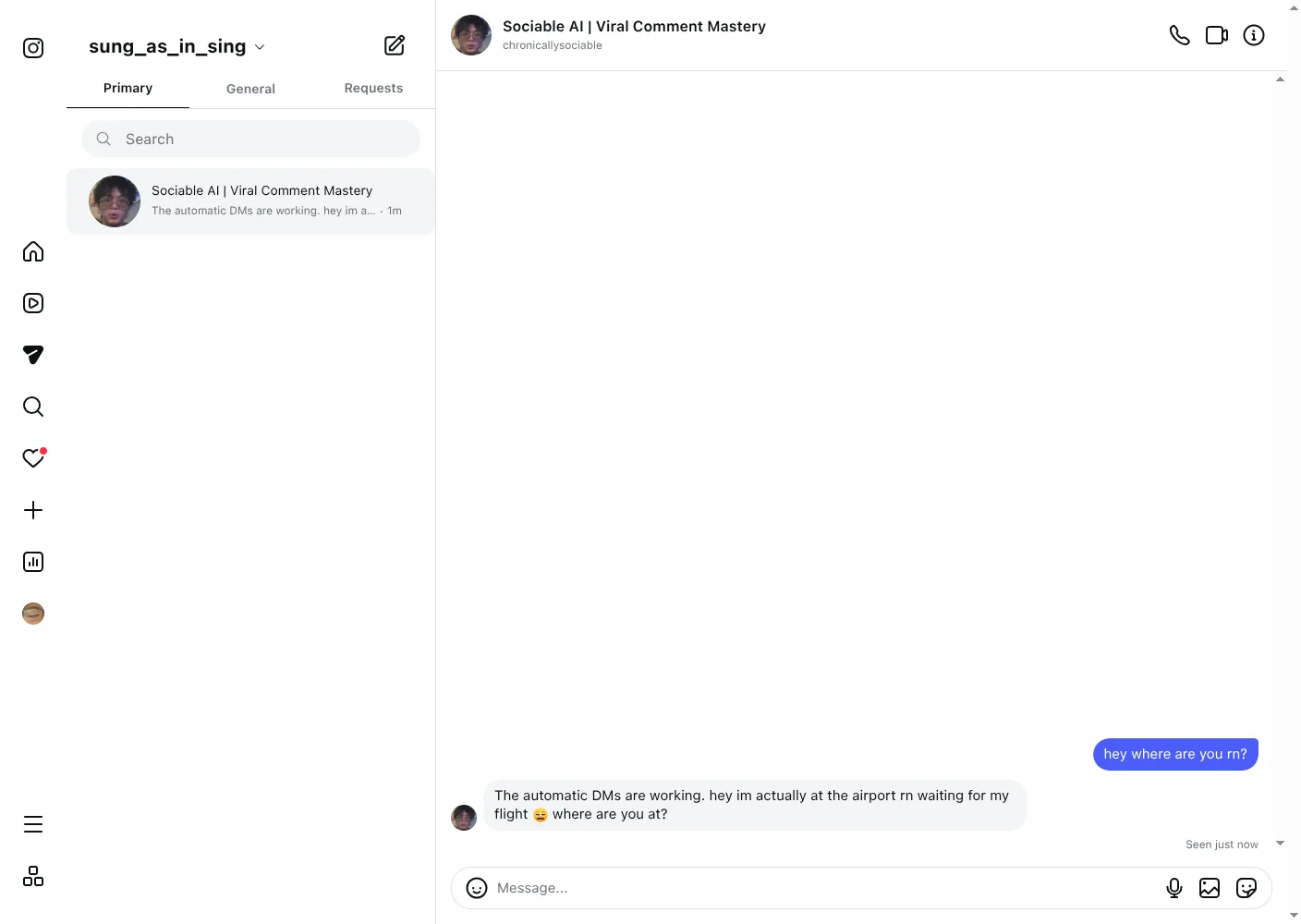
The example on Instagram, as the other person sees it.
See what your sequences sent
Section titled “See what your sequences sent”Read one conversation
Section titled “Read one conversation”In the left menu, click Messages and open the conversation. A lightning icon marks the point where a sequence started, with the sequence name and a View run link. Each reply shows the sequence and the action that it belongs to, and the word Automated.
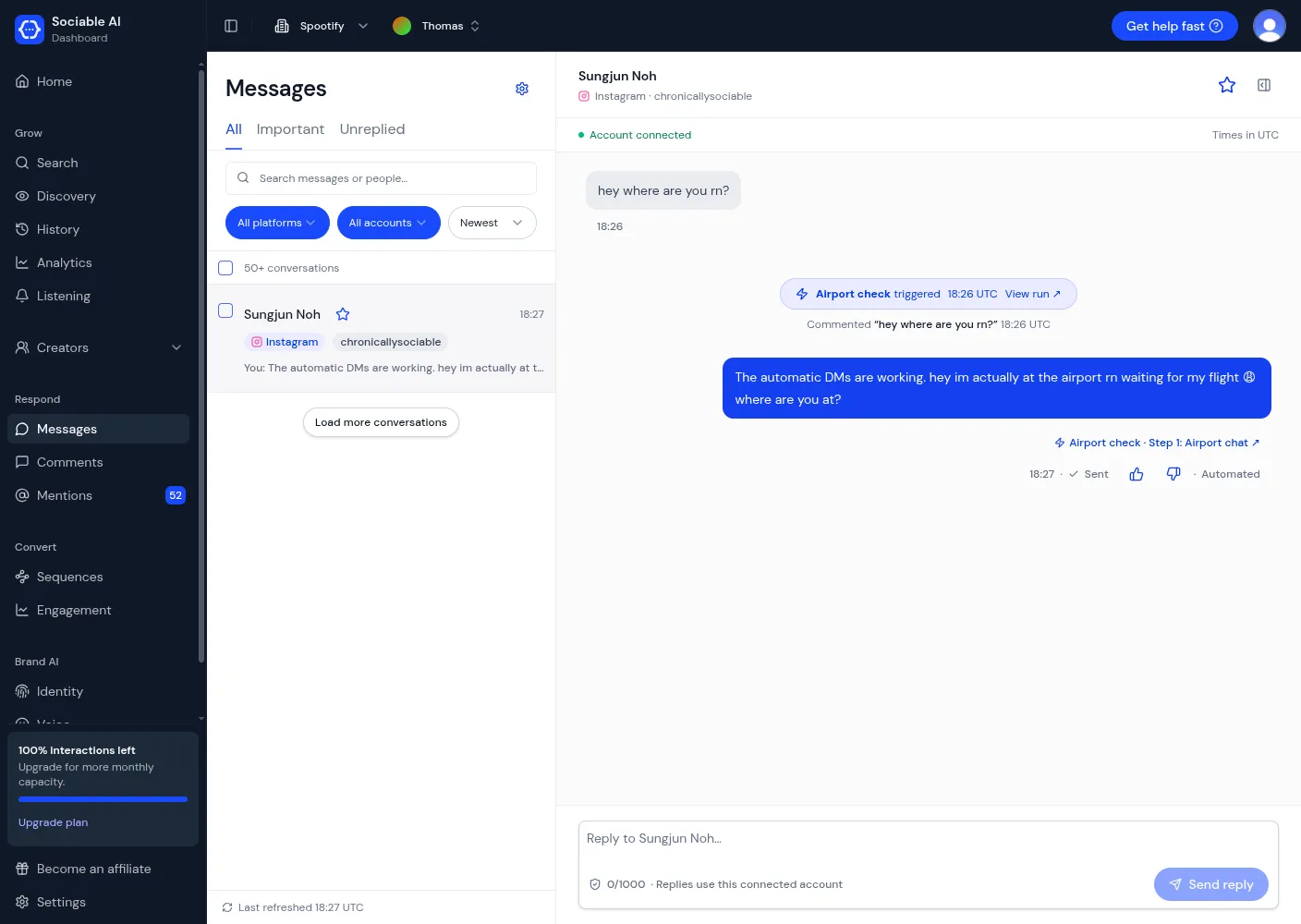
A conversation on the Messages page.
The line under the label says “Commented”, also when the message was a DM.
See the totals for one sequence
Section titled “See the totals for one sequence”On the Sequences page, click the arrow icon on the line of the sequence. The page shows how often the sequence started (Triggered), how often the Agent replied (Responded), and a Trigger Log with one line for each start.
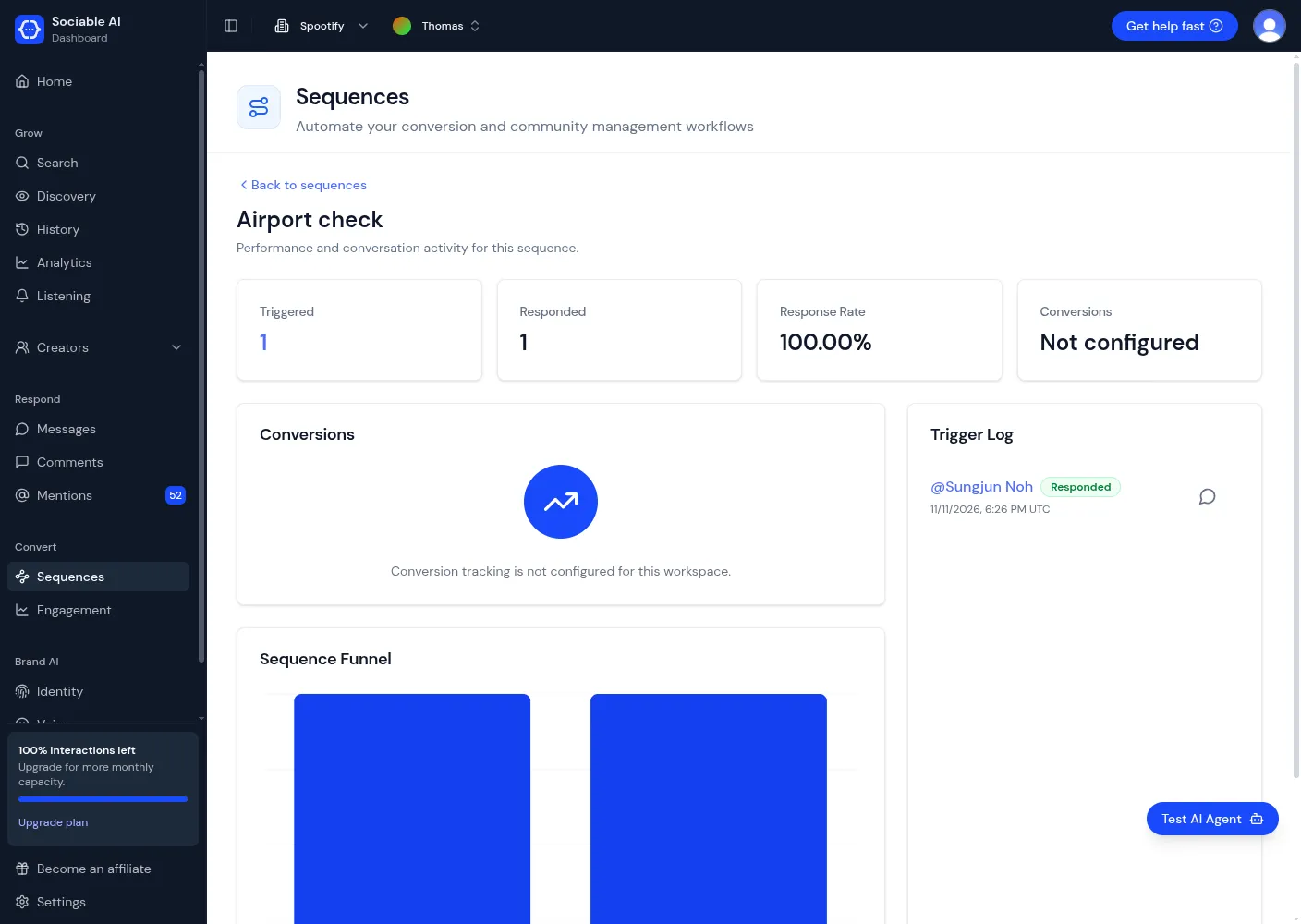
The totals for the example after one real DM.
Words used in this guide
Section titled “Words used in this guide”| Word | Meaning |
|---|---|
| Agent | The part of Sociable AI that writes and sends replies for one brand. You choose it at the top of the page. The screen also calls it “AI Agent”, “AI” and “Persona”. |
| Sequence | A set of instructions for one kind of conversation. It has the parts When, Then, Follow up and Until. |
| Trigger | The description in the When part. A conversation that fits it starts the sequence. |
| Scenario | A trigger rule that describes what the person wants, in a sentence. |
| Action | One entry in the Then part. It can last for several messages. |
| Stop trigger | The description in the Until part. A message that fits it ends the sequence. |
| Person | Whoever sends the DM or writes the comment. They do not have to follow your account. The screen sometimes says “follower” or “user”. |
| DM | Direct message. A private message on Instagram or Facebook. |
| Brand Voice | The setting that tells the Agent how to write in every conversation. |
| Connected account | A social media account that you linked to Sociable AI under Settings, then Integrations. |
Get help
Section titled “Get help”In Sociable AI, click Get help fast at the top right. You can also email contact@sociable.how.
Include these three details:
- The name of the sequence.
- The test message that you sent, and where you sent it: the Test AI Agent panel or Instagram.
- What the Agent did, and what you expected.
If a part of this guide is unclear, send the heading of that part to the same address.
Related documents
Section titled “Related documents”- Sociable AI: where you sign in and open Sequences.
- Risks and considerations for Sequences: Meta’s rules, and how to keep your Agent within them.
- Sociable AI documentation: other guides for Sociable AI.